
#evpn #multihoming #srlinux
This is the second part of the EVPN Multi-homing post.
Here, I will focus more on how EVPN manages the challenges with multihoming.
In the first part, we learned the basics such as Ethernet Segments, multihoming modes, LAG and so on.
Here, you will hopefully learn more about EVPN route types (RT), designated forwarder (DF), local bias (split-horizon), aliasing procedures and more…
Let’s get started!
EVPN Route Types
You may be familiar with EVPN route types, but let’s recap anyway:
| Type | Route Name | Function |
|---|---|---|
| 1 | Ethernet Auto-discovery (AD) | To provide aliasing and fast convergence for multihoming |
| 2 | MAC/IP Advertisements | Advertise MAC/IP addresses for ARP suppression |
| 3 | Inclusive Multicast Ethernet Tag (IMET) | Auto-discovery of member PEs to flood BUM traffic |
| 4 | Ethernet Segments (ES) | ES discovery and DF selection for multihoming |
| 5 | IP Prefix | To advertise IP prefixed for inter-subnet connectivity |
RT1 and RT4 are used for EVPN multihoming. These two route types are advertised when an ethernet segment is created and connected to an EVPN instance (EVI).
Below are some extended communities of RT1 and RT4:
ESI Label: Indicates the redundancy mode; all-active or single active. – RT1
DF Election: The DF election algorithm to use. – RT4.
ES-import Route Target: An extended community to allow PEs to import relevant ES advertisement. Auto-generated from ESI. – RT4.
Route Type 1
RT1 will let remote PEs know about the multihoming mode (ESI Label). In the case of all-active mode , RT1 enables load-balancing for a given EVPN instance, which is called aliasing.
RT1 also ensures fast convergence by sending withdrawals upon a link failure so that remote PEs update their next-hops.
Route Type 4
RT4 is advertised between the ES peers, PEs that share the same ES. When a RT4 is received by a remote PE, it checks ES-import RT and import only the matching route targets.
With RT4, PEs discover all ES peers and elect designated forwarder.

EVPN Multi-homing Procedures
Let’s look at some EVPN procedures that support load-balancing and prevent loops and duplicates on multi-homed links.
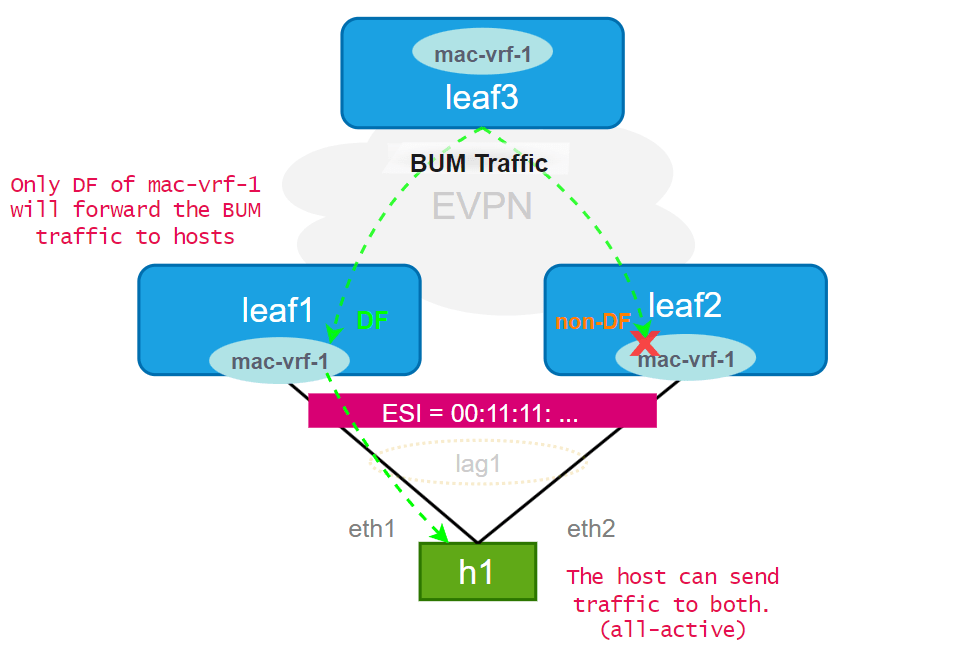
Designated Forwarder Election
A DF is elected via RT4 message exchange between the ES peers, based on the selected algorithm.
In single-active mode, the DF has the active links and forwards all traffic. The multihomed links to other ES peers will be standby.
In all-active cases, only the DF forwards the BUM traffic to the multi-homed host. This prevents duplicate traffic.
Local-Bias
The local-bias filtering, a.k.a. split horizon but actually the replacement of the split horizon, prevents BUM traffic from being forwarded back to the originating host.
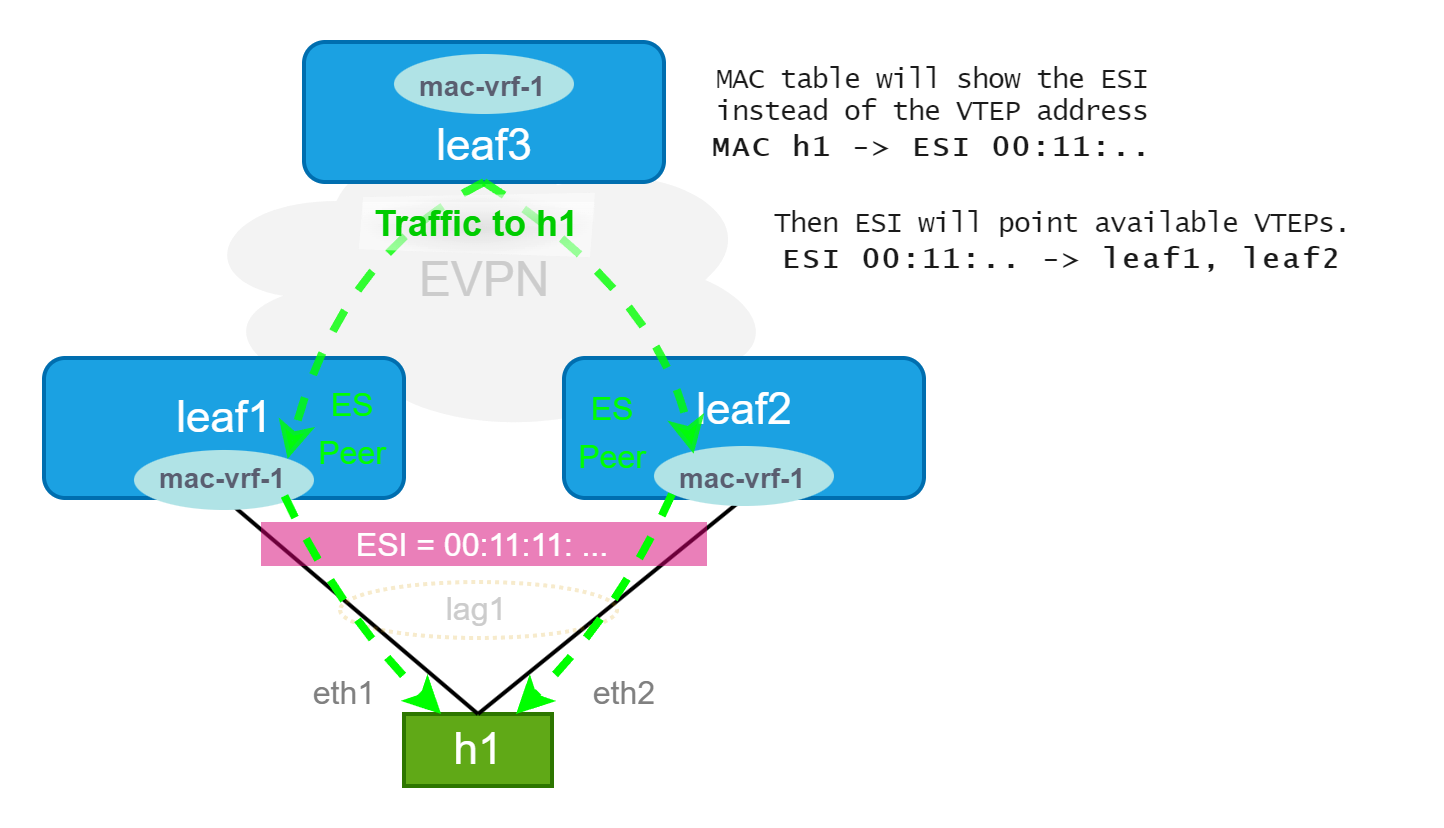
Aliasing
When the multihoming mode is all-active, the traffic needs to be load balanced to all links.
With aliasing, the MAC of h1 is locally learned by an ES peers and will be advertised(RT2) with the ESI. When a remote leaf(3) needs to send traffic to h1, it will see the ESI-1 (00:11:11…) as next hop. Then it will look up ES’s tunnel-endpoints (populated by RT1) and forward the traffic to one of them.
This way, the traffic will be load balanced to all ES peers even if the MAC is not learned from them.
Verify your SR Linux EVPN-MH Lab
Now, let’s check the lab to verify all these.
In the first part, we created a lab with EVPN all-active multi-homing. Let’s first check the LAG and LACP status there.
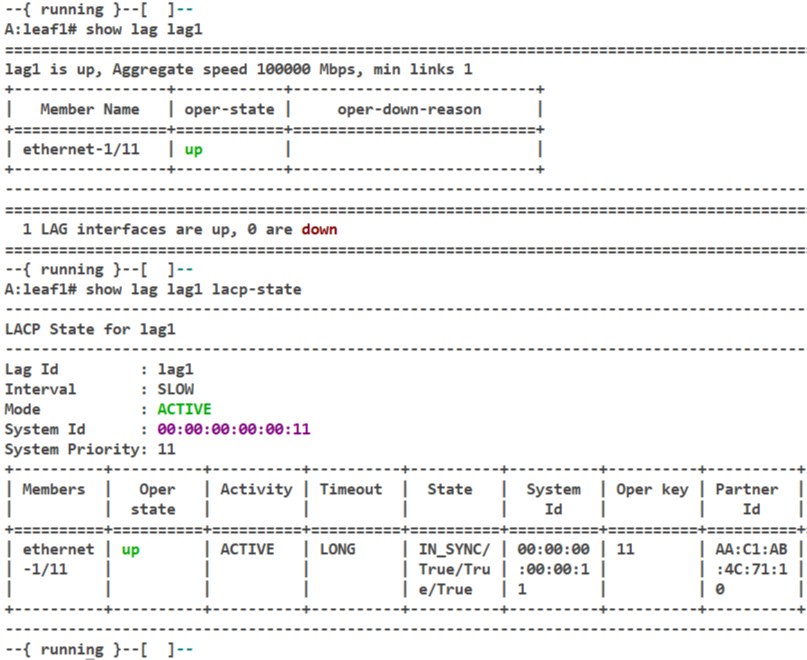
They seem okay. The details of the ES we configured in the first part:
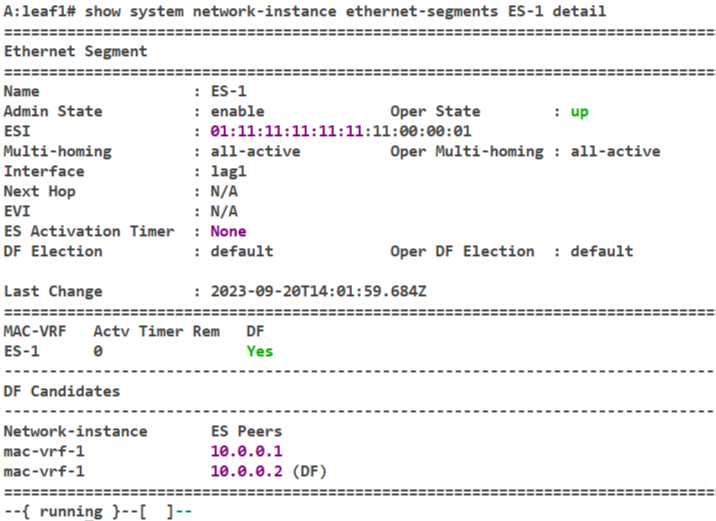
Here, we see the MH mode of ES-1 and the interface(lag1) associated with it. Also the DF election method(default) and the ES peer that elected as DF(10.0.0.2).
The ES and the LAG look okay. Now, send some traffic(ping from h1 to h4) to trigger EVPN routes and check the advertised evpn routes of the leaf1.
Note the host MAC address for the verifications in the following steps.
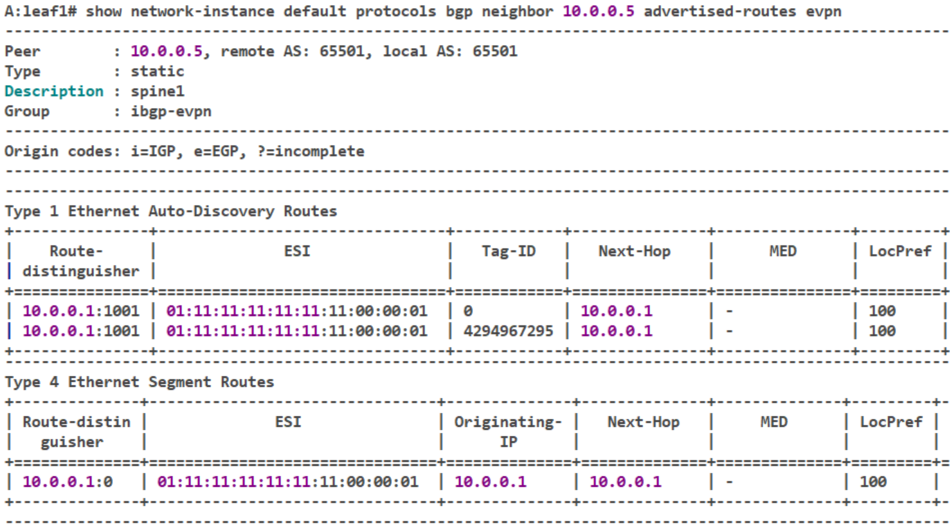
In the advertised EVPN routes, find the type 1 and 4 tables to see ES-related updates.
We see two entries for the same ES in RT1. The one with tag-id (0) is for load-balancing and the other one (4294967295) is for mass withdrawal, basically to converge faster.
In RT4, leaf1 advertises the DF-election messages and route-target to leaf2 the only ES peer. Let’s see what leaf2 receives:
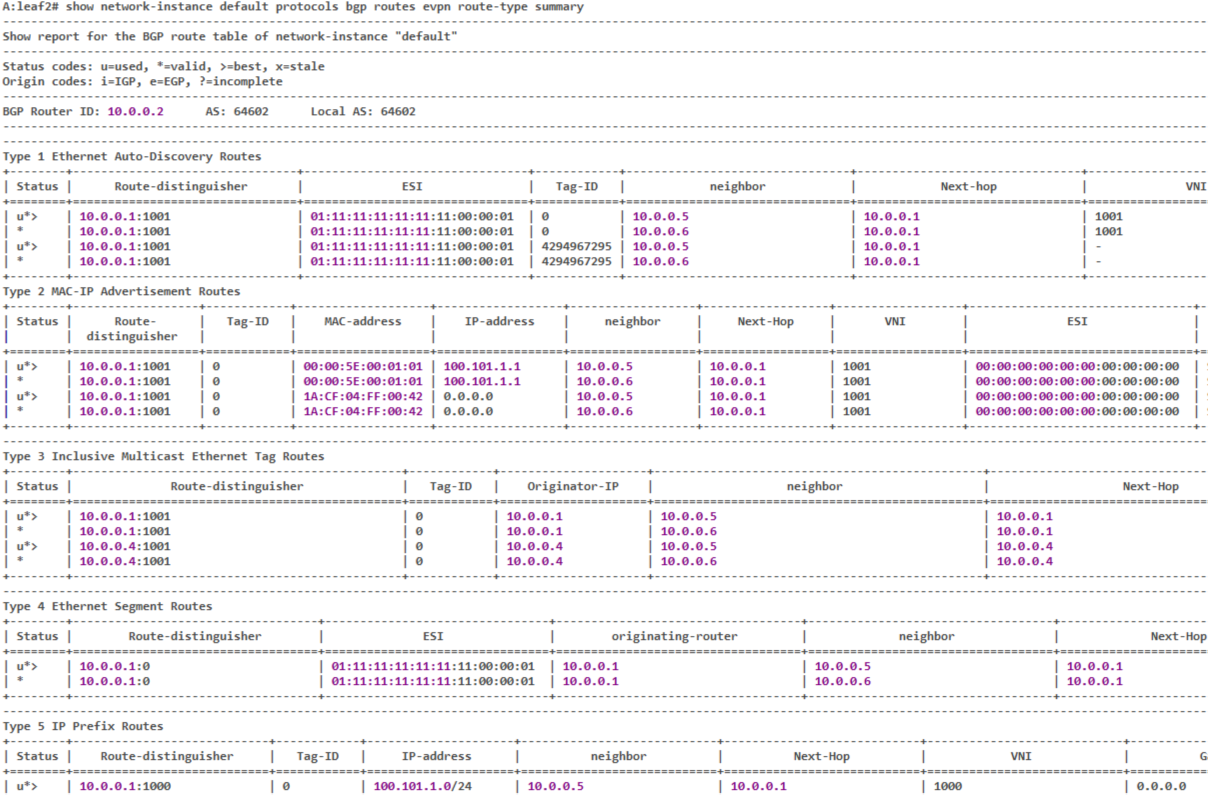
It receives all kinds of route types in this case. RT1 and RT4 for ES that it shares with leaf1, and the others for MAC, IP prefix and auto-discovery advertisements.
Let’s see what a remote PE(leaf4) that has the same network-instance (mac-vrf-1).
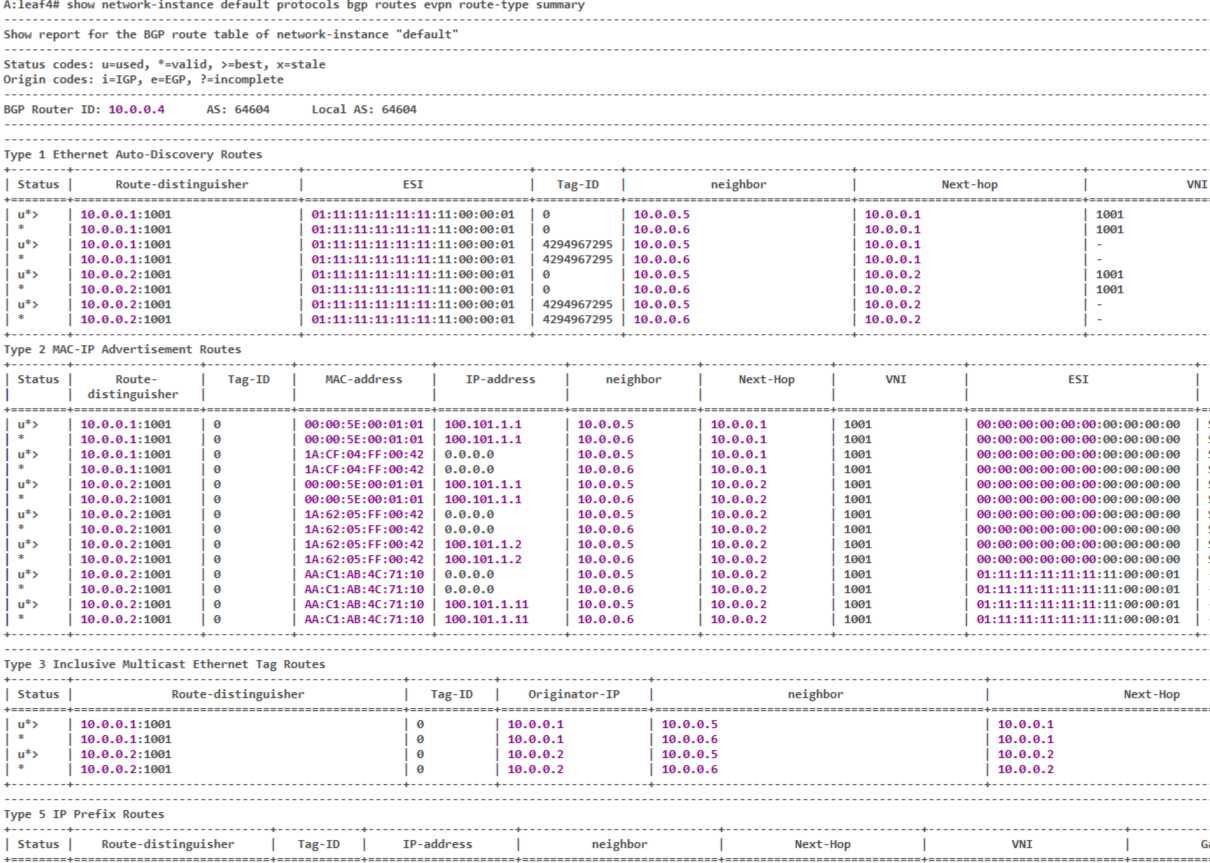
The leaf4 gets the RT1 because it has the mac-vrf-1 and may forward traffic to the ES-1. But it doesn’t have RT4 since it’s not one of the peers of any ES.
Also, we see the ESI number of ES-1 in RT2 for the MACs learned from that ES.
What about leaf3? It has been configured neither with ES-1 nor with mac-vrf-1.
Let’s see:
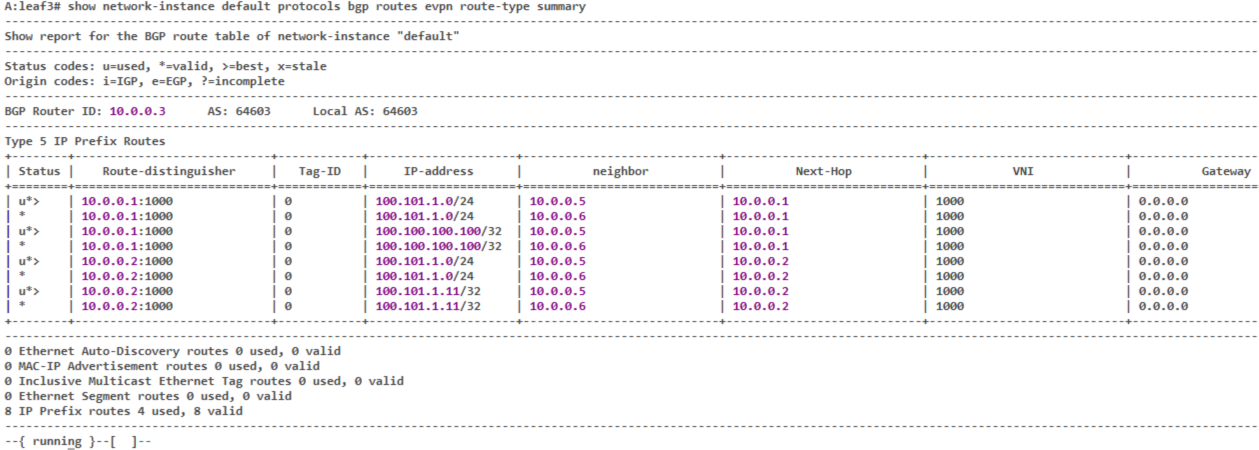
The leaf3 doesn’t get any RT1 or RT4 in this case. Apparently, it hasn’t learned any MACs, so no RT2 as well. There are some prefixes from a remote IP VRF so that it gets RT5 routes.
Lastly, let’s see how the mac-vrf forwarding table of remote PE, leaf4 in this case, shows the MAC addresses of the multi-homed CE (ending with 71:10).
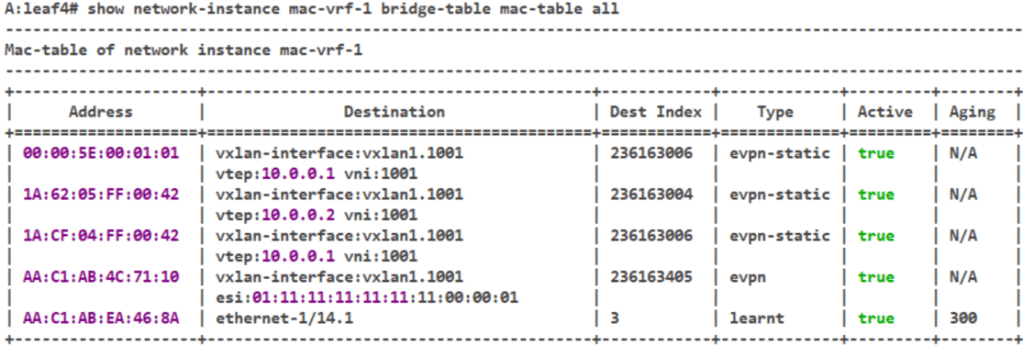
The MACs learned via EVPN shows the VTEP(PE) in the destination column while the MACs learned from multi-homed links (ES), have ESI instead which may refer to multiple VTEP destinations.
The MAC table will not be changed even if one of the ES peers fail with this aliasing. To see the destination VTEPs that ESI refers to:
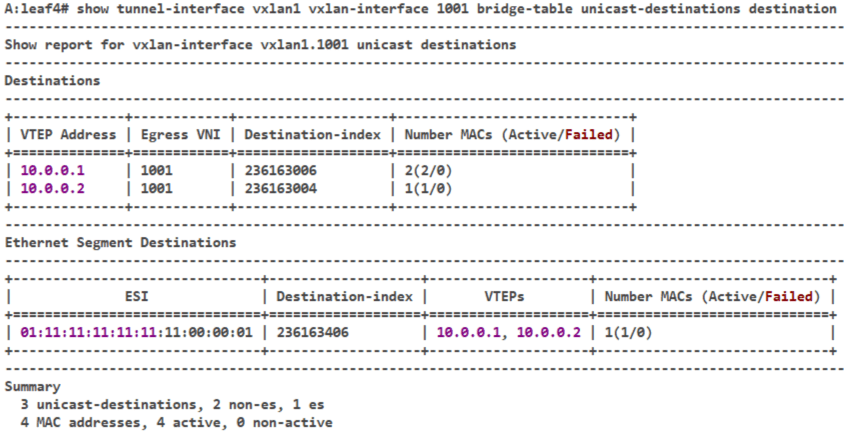
There we see the leaf1 and leaf2 addresses as destinations for the ES-1.
And, that concludes this post!
 Network, Cloud and Everything